

-
Ali Razzak
-
Dec 16, 2025, 12:15:00 AM
Have you ever finished a month thinking your recurring revenue was on track, only to realise some subscriptions didn’t renew, upgrades were missed, or churn quietly ate into your profits? It’s frustrating, isn’t it? You rely on predictable income to plan budgets, hire new team members, and invest in growth, but hidden gaps in Monthly Recurring Revenue (MRR) throw everything off.
For subscription-based, retainer-driven, and service-led businesses, MRR isn’t just another metric; it’s the heartbeat of your business. When tracked accurately, it tells you exactly how much revenue to expect each month, helping you forecast, budget, and make confident decisions.
That’s where HubSpot comes in. When set up correctly, it centralises all your revenue data, automates calculations, and provides dashboards that give you a real-time view of recurring revenue. With deals, products, custom properties, and workflows all aligned, HubSpot becomes your single source of truth, so you can catch problems early, act proactively, and grow your business with confidence.
Understanding Monthly Recurring Revenue in HubSpot
What Monthly Recurring Revenue Represents
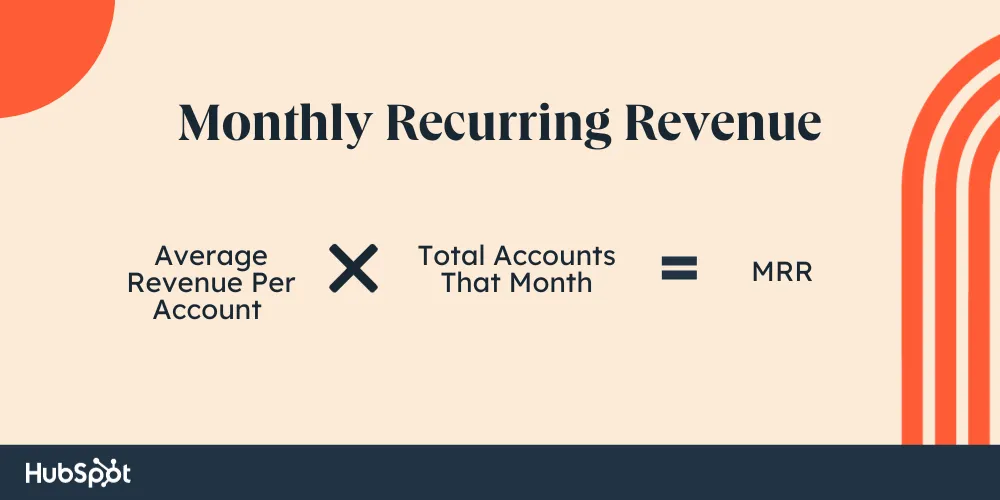
HubSpot MRR tracking reflects the predictable income generated from active subscriptions, retainers, or ongoing service agreements. Unlike total contract value or one-off sales, MRR focuses only on recurring commitments and normalises them into monthly figures.
For example, a customer paying annually still contributes a monthly MRR value, even though cash is received upfront. This normalisation is critical for accurate trend analysis and month-over-month comparisons. In HubSpot, MRR is not a default metric, so businesses must intentionally define how recurring revenue is calculated, stored, and reported.
Why HubSpot Requires Structured MRR Modelling
HubSpot is flexible by design, but that flexibility can become a weakness if revenue logic is not clearly defined. Without proper structure, teams may enter deals inconsistently, use inconsistent naming conventions for products, or manually calculate revenue. This results in unreliable reports and dashboards that leadership cannot trust.
A strong MRR setup in HubSpot ensures that recurring revenue is consistently captured, updated automatically, and reflected accurately across all reports.
Defining MRR Rules Before Configuration
1. Establishing What Qualifies as Recurring Revenue
The first step in tracking MRR is defining what counts as recurring revenue within your business. This includes identifying which products or services are billed regularly, how billing frequencies are handled, and when MRR officially begins.
Some businesses recognise MRR at deal close, while others start MRR only after onboarding or service activation. These rules must be clearly defined upfront, as they directly impact reporting accuracy. Without clear definitions, MRR numbers may look healthy on paper while masking underlying revenue risks.
2. Separating One-Time and Recurring Revenue
A common mistake is mixing one-time fees, such as setup costs or implementation charges, with recurring revenue. In HubSpot, these should always be tracked separately. Doing so ensures that MRR reflects only sustainable income and is not artificially inflated by non-recurring charges.
Structuring Deals for Accurate HubSpot MRR Tracking

Using Deals to Represent Subscription Commitments
In HubSpot, deals should represent subscription agreements or recurring contracts rather than individual invoices. Each deal should clearly indicate whether it contributes to MRR and what type of recurring revenue it represents.
By aligning deal stages with the customer lifecycle, businesses gain better visibility into when MRR is created, expanded, reduced, or lost. This structure allows HubSpot to track revenue movement rather than static values.
Capturing Subscription Lifecycle Changes
Recurring revenue is dynamic. Customers upgrade, downgrade, pause, or cancel services. HubSpot deals and properties must be designed to accurately reflect these changes. Without this, MRR reports become outdated quickly and fail to reflect real business performance.
Using Products and Line Items to Normalise MRR
1. Why Product Standardisation Matters
Products and line items are central to accurate MRR tracking in HubSpot. Each recurring product should have a clearly defined monthly value, regardless of how often the customer is billed. This ensures consistent reporting and eliminates distortions caused by annual or quarterly billing cycles.
Standardised products also make it easier to analyse which offerings contribute most to recurring revenue and which are most prone to churn or downgrades.
2. Avoiding Inconsistent Revenue Reporting
Without consistent product usage, MRR reporting becomes unreliable. Different sales reps may enter similar products in different ways, leading to fragmented data. Normalising products across the CRM ensures that MRR metrics remain clean, comparable, and scalable as the business grows.
Leveraging Custom Properties for HubSpot MRR Tracking
Building MRR-Specific Revenue Properties
HubSpot allows businesses to create custom deal properties specifically for recurring revenue tracking. These properties can store monthly values, billing frequencies, contract durations, and MRR classifications.
By separating total deal value from monthly recurring value, businesses gain clarity into how much revenue is predictable versus one-time. These properties form the backbone of accurate MRR reporting and forecasting.
Classifying MRR Types for Deeper Insights
Not all MRR is created equal. New MRR, expansion MRR, contraction MRR, and churned MRR each tell a different story about business performance. HubSpot properties can be used to categorise revenue changes, allowing teams to analyse growth quality rather than just top-line numbers.
Automating MRR Updates with HubSpot Workflows
1. Eliminating Manual Revenue Errors
Manual MRR updates are a significant source of data inconsistencies. HubSpot workflows can automatically calculate and update MRR when deals move through stages, close, or change status. This ensures revenue data remains accurate without manual intervention.
Automation also reduces the risk of human error, particularly in fast-growing teams with high deal volume.
2. Managing Expansion, Downgrades, and Churn
Workflows can detect changes in deal values or subscription status and automatically update MRR properties. When a customer upgrades, HubSpot increases expansion MRR. When a customer downgrades, or cancels, contraction or churn MRR is recorded instantly.
This automation provides real-time visibility into revenue movement and helps teams respond proactively to risks.
Building HubSpot Dashboards for MRR Visibility

Creating Clear and Actionable MRR Dashboards
Dashboards turn raw MRR data into insights leadership can act on. Effective MRR dashboards show current active MRR, month-over-month growth, net new MRR, churn rates, and expansion trends.
These dashboards help decision-makers understand not just how much revenue the business has, but how stable and sustainable that revenue truly is.
Using Dashboards to Spot Early Revenue Risks
MRR dashboards can highlight warning signs, such as declining net-new MRR, rising churn, or stagnant expansion. These trends often indicate deeper issues in onboarding, pricing, or customer success that need immediate attention.
Using HubSpot MRR Tracking to Detect Revenue Leakage
1. Identifying Hidden Gaps in Revenue Capture
Accurate MRR tracking in HubSpot helps businesses detect early signs of revenue leakage. Examples include closed-won deals with missing MRR values, active customers not contributing recurring revenue, or frequent downgrades shortly after onboarding.
These patterns often go unnoticed in manual reporting but become clear when MRR data is centralised and automated.
2. Turning Revenue Data into Preventive Action
Once revenue leakage is identified, teams can take corrective action by improving sales qualification, refining onboarding processes, or adjusting pricing strategies. HubSpot MRR tracking shifts revenue management from reactive problem-solving to proactive prevention.
Aligning Teams Around a Single MRR Source of Truth
Breaking Down Silos with Shared Revenue Data
MRR tracking is most effective when sales, finance, and customer success teams all rely on the same data. HubSpot enables this alignment by centralising revenue information and making dashboards accessible across departments.
When everyone uses the same numbers, accountability improves and internal disputes over revenue performance decline.
Improving Forecasting and Strategic Planning
Reliable MRR data allows businesses to forecast revenue more accurately and plan growth initiatives with confidence. Whether expanding into new markets or investing in additional resources, leadership can make informed decisions based on predictable income.
How Team CloudSource Helps Businesses Track MRR in HubSpot
1. Designing Scalable MRR Frameworks
Team CloudSource specialises in building scalable MRR tracking frameworks within HubSpot. We help businesses define revenue rules, configure properties, automate calculations, and design dashboards that reflect real business performance.
Our approach with HubSpot ensures that MRR tracking grows with your business, rather than breaking under increased complexity.
2. Transforming HubSpot into a Revenue Intelligence Platform
Beyond implementation, Team CloudSource continuously optimises HubSpot to surface insights, detect revenue leakage early, and support long-term growth. By combining technical HubSpot expertise with revenue operations strategy, we help businesses turn data into actionable intelligence.
Conclusion
Tracking Monthly Recurring Revenue in HubSpot is not just about reporting numbers; it is about building a disciplined, data-driven approach to growth. Accurate MRR tracking enables predictable revenue, early risk detection, and confident strategic planning.
When HubSpot is structured, automated, and aligned with clear revenue rules, it becomes a powerful engine for sustainable recurring revenue. Businesses that invest in proper MRR tracking today position themselves for stability, scalability, and long-term success tomorrow.
FAQs
Q1: Does HubSpot track Monthly Recurring Revenue automatically?
HubSpot does not track MRR by default. However, with custom properties, products, workflows, and dashboards, it can be configured to accurately and consistently calculate and report MRR.
Q2: What’s the difference between deal value and MRR in HubSpot?
Deal value represents total contract value, while MRR reflects predictable monthly income. Separating these ensures one-time fees don’t inflate recurring revenue reports.
Q3: How do I track annual subscriptions as monthly revenue?
Annual subscriptions should be normalised by dividing the total value by a monthly amount. This monthly figure is stored in a custom MRR property for consistent reporting.
Q4: Can HubSpot track upgrades, downgrades, and churned MRR?
Yes. Using deal stages, custom properties, and workflows, HubSpot can automatically classify new, expansion, contraction, and churned MRR in real time.
Q5: How accurate is MRR tracking in HubSpot compared to finance tools?
When properly configured, HubSpot provides highly accurate operational MRR insights. For full financial reporting, it works best when aligned with accounting or billing systems.